


Pronto - San Diego
4.51.74K Reviews
App Specs
- Version
- 4.134.0
- Updated On
- License
- Free
- Downloads
- 500,000+
- Developer
- San Diego MTS
- Categories
- Travel & Local
- Platform
- Android
Screenshots
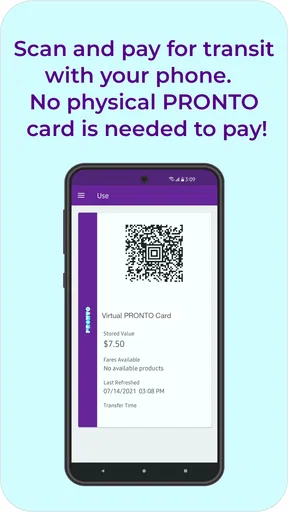
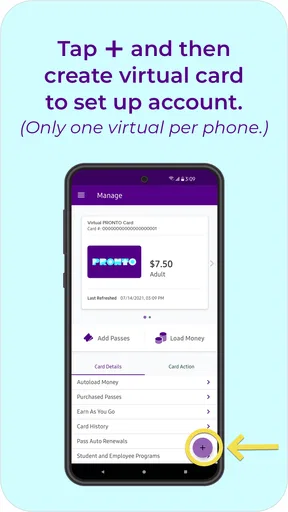
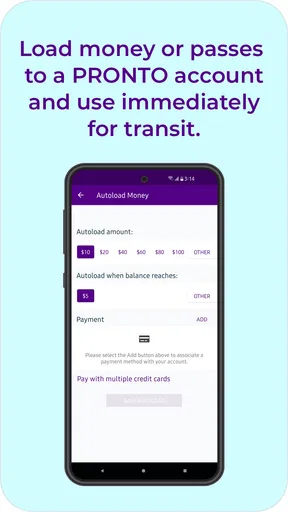
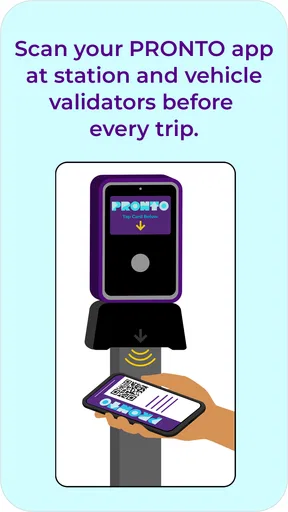
 Analysis by AppCompare
I found Pronto most useful when I treated it as a practical fare companion rather than a complete travel planner. It is a free Travel & Local app from San Diego MTS for buying MTS and NCTD fares, and its main promise is straightforward: make the payment side of a public-transport trip less awkward. In everyday use, that focus can be a real advantage, especially when I am already near a stop and do not want to handle cash, search for a machine, or work out the fare process at the last moment.
The app has a 4.5 average from around 4.5 thousand ratings, with more than 500 thousand installs. Those figures suggest that it has become a familiar option for San Diego-area riders, but popularity alone does not make a transit app comfortable for everyone. What matters here is how clearly the screens communicate, how much effort a rider must make under pressure, and whether the app remains workable when a person has limited vision, reduced dexterity, hearing differences, a cognitive disability, or simply a phone that is difficult to use outdoors.
How the interface feels when I need a fare quickly
My first impression of Pronto is that its purpose is easier to understand than that of many broader transport apps. It is not trying to be a general-purpose map, a social travel guide, and a ticket wallet all at once. The central task is paying for MTS and NCTD travel, so a new user can approach it with a specific question: how do I get the fare I need onto my phone or account?
That narrow purpose helps readability. A rider who is already familiar with San Diego transit does not have to dig through unrelated destination content before dealing with payment. I also appreciate that the app’s identity is tied directly to the local systems it serves. Someone deciding between an MTS trip and an NCTD trip is less likely to wonder whether the purchase belongs in a separate application.
Still, a simple purpose does not automatically mean a simple journey. Fare apps often involve several decisions in a short sequence: choosing the transport system, selecting a fare, signing in or creating an account, reviewing the purchase, and making sure the result is ready before boarding. For a first-time rider, those steps can feel more demanding than the store summary suggests. I would set aside a few minutes before leaving, particularly if I were buying a fare while moving through a busy station.
The best accessibility feature is often a predictable workflow. Pronto benefits from keeping the rider focused on one job, but it is most comfortable when I am not rushing. I would not make my first purchase while boarding a crowded vehicle, with one hand occupied and a weak mobile signal. Preparing before the trip gives me time to read each choice, correct a mistake, and confirm that the purchase has completed.
Readability is more than large text
For riders with low vision, the important question is not only whether text can be enlarged. Clear wording, sufficient contrast, sensible grouping, and obvious confirmation states matter just as much. Pronto’s fare-focused design gives it a better starting point than a cluttered travel portal, because the user is not competing with a large amount of editorial content. However, I would still check the app with the phone’s own display and text settings rather than assuming every screen will remain equally easy to read.
Worth Reading Before You Choose

Flipboard Shows What News Apps Must Do Beyond the Feed

Switching to Android Auto Means Rethinking Your Driving Routine

Google Calendar Makes a Crowded Week Easier to Manage

Ludo King Makes the Most of the Minutes Between Plans

Baby Panda World Brings Quick Play to Modern Phones, but Its Game Library Feels Busy

ESPN’s Live Game View Makes Following Close Games Easier
That is especially relevant when a person uses the app outside. Bright sunlight can wash out a screen, while glare makes small labels and subtle buttons harder to distinguish. A rider with changing vision may find it easier to complete the purchase indoors, then open the relevant screen before walking to the stop. This is a small habit, but it avoids turning a fare transaction into a visibility test at the curb.
People with dyslexia, attention difficulties, or limited English may also benefit from slowing down and checking the fare description rather than tapping the first familiar-looking option. Local transit terminology can be confusing even for experienced passengers, and an app cannot remove every ambiguity created by the transport network itself. I would prefer plain, specific labels and a final review that makes the selected service and fare easy to verify.
Navigation for different ways of using a phone
Pronto is likely to suit riders who are comfortable with ordinary mobile navigation: tapping controls, moving between screens, and reviewing a digital purchase. It can be less comfortable for someone who relies heavily on a screen reader, switch access, voice control, or very large interface elements unless the current version works well with the phone’s accessibility tools. The app is listed with a minimum operating-system requirement of Android 8.0, and it is currently version 4.134.0, so keeping the device software and the app current is a sensible first step for anyone depending on built-in assistance.
I would also recommend testing the complete path before a critical journey. Do not test only the opening screen. Try selecting the intended fare, moving through the account or payment steps, returning to the purchased fare, and locating whatever must be shown during travel. This reveals problems that a quick glance cannot: unlabeled controls, focus moving in an unexpected order, text that gets cut off when enlarged, or confirmation information that is hard to find.
That advice applies to older passengers as much as to disabled riders. A person who rarely uses mobile payments may not need more features; they may need fewer decisions and more reassurance. If I were helping a relative, I would walk through one complete purchase with them at home, write down the basic sequence in their own words, and make sure they know how to reopen the fare afterward. The goal is independence, not making them ask for help at every stop.
Motor, sensory, and real-world access
Touchscreen fare purchases can remove one physical barrier: there is no need to handle coins or stand at a machine while searching for the correct selection. That may help riders with limited hand strength, tremors, joint pain, or difficulty reaching a kiosk. A phone can be held in a more comfortable position, and the purchase can be completed before the rider reaches the vehicle.
At the same time, mobile payment introduces its own motor demands. Small targets, repeated taps, scrolling, typing, and time-sensitive decisions can be tiring for someone with reduced dexterity. I would avoid attempting a purchase while walking or balancing on a moving bus. Completing it while seated, with the phone supported, is safer and gives the user more control. If typing is difficult, preparing account details and payment information in advance may reduce the number of actions needed in public.
People with tremors may also worry about accidental taps. A deliberate pause between selecting a fare and confirming it is worthwhile. I would review the final screen carefully instead of treating the first successful-looking tap as proof that everything is finished. This is not a criticism unique to Pronto; it is a general trade-off of using a touchscreen for something that affects a journey. The app makes access to fares more flexible, but it cannot make a glass screen as forgiving as a large physical control.
Sensory needs deserve equal attention. A busy station combines announcements, engine noise, crowds, glare, and interruptions. Someone who is autistic, hard of hearing, or easily overwhelmed may find it much easier to complete the fare process in a quiet place before entering that environment. I would also avoid relying on an audio cue alone. Visual confirmation is important for riders who cannot hear alerts, while a clear, non-flashing presentation is preferable for people sensitive to motion or visual overload.
For a blind rider, the key issue is whether each task works with the phone’s spoken-access technology, not whether the app looks uncluttered to a sighted person. I would encourage a blind user to test Pronto with their usual screen reader before depending on it for an unfamiliar route. If a trusted companion helps with the first setup, that person should describe the process and let the rider repeat it, rather than taking over the account permanently.
A realistic trip where preparation changes everything
Imagine I am meeting someone downtown after work and need to use MTS, with a possible connection involving NCTD. I would not wait until the vehicle arrives. At home or in the office, I would open Pronto, choose the appropriate fare, complete the purchase, and confirm that I can find it again without repeating the transaction. I would then keep the phone charged and place it somewhere easy to reach.
That routine helps in several ways. A rider with limited mobility has less need to hurry toward a machine. Someone with hearing loss can complete the important payment step without depending on an announcement. A person with anxiety or cognitive fatigue can make the decision in a quiet setting instead of under pressure. A passenger with low vision can adjust brightness and enlarge text before the glare and movement of the street make reading harder.
The trade-off is that preparation shifts responsibility onto the phone. If the battery is nearly empty, the device is damaged, or the rider forgets the login details, the digital route becomes less convenient. I would treat Pronto as one part of a travel plan, not as the only thing keeping the trip possible. Knowing the intended service, carrying a charged phone, and allowing extra time remain sensible even when the fare purchase itself is quick.
Where it beats usual alternatives
Compared with paying at a physical location, a mobile fare app can be more private and less physically demanding. I do not have to queue beside a machine, manage cash, or make a purchase while other passengers wait behind me. For visitors who are unsure how the local fare process works, having the transaction in one place can also feel less intimidating than approaching an unfamiliar kiosk.
Compared with using a general journey-planning app, Pronto has a more specific job. A mapping app may be better for comparing routes, walking directions, and arrival estimates, while Pronto is the more relevant tool when the immediate problem is obtaining an MTS or NCTD fare. I would not replace a route planner with it if I needed detailed navigation. I would use the two roles separately: plan the journey where planning is strongest, then use Pronto for the fare task it is designed around.
Compared with relying on a physical card or cash, the app offers convenience but less independence when a phone is unavailable. Some riders will prefer a non-phone option because they do not want to manage accounts, battery life, mobile data, or a touchscreen. That is a legitimate choice, especially for people who find digital interfaces exhausting or who travel only occasionally. Pronto is not automatically better; it is better when the phone is already a comfortable and dependable tool.
Questions I would settle before depending on it
The first question is whether a rider can use it without an account or payment setup. I would not assume that the opening screen tells the whole story. Before a significant trip, I would install it, follow the setup process, and see what information is requested. This is particularly important for anyone who needs assistance from a family member, because account ownership and payment control should remain clear.
The second question is what happens when connectivity is poor. I would complete a test purchase where I have a reliable connection, then learn how to reopen the fare without searching through the entire app. A transit app may be easy to use in a living room and far more stressful underground, inside a large building, or in a crowded area. Preparing the relevant screen ahead of time is a practical safeguard, though I would not assume that every function works offline.
The third question is whether the selected fare matches the whole journey. Because Pronto covers both MTS and NCTD fares, I would pay close attention when a trip crosses services or involves a transfer. I would not choose based only on the destination name. I would check the service covered by the fare and, if the journey is unusual, confirm the rules through official transit information before purchasing.
The fourth question is whether a person can independently show or manage the fare after buying it. I would practice that part, not just the payment. Someone with limited dexterity or vision may be able to complete a purchase with help but struggle to retrieve it later. A short rehearsal can reveal whether the app supports the person’s actual travel routine or merely makes the initial transaction possible.
Remaining barriers and who should skip it
Pronto cannot solve every access problem in public transportation. It does not remove uneven sidewalks, crowded platforms, inaccessible vehicles, confusing transfers, or the need to understand where to board. A digital fare is only one layer of the journey. Riders with mobility limitations should judge the entire route, not infer that an easier payment process guarantees an easy trip.
The app may also be the wrong choice for someone who dislikes smartphone administration. If creating an account, entering payment information, checking a digital fare, and maintaining a charged device all feel like more work than using a physical alternative, the convenience disappears. I would also hesitate to recommend making it the sole option for a person whose phone is shared, unreliable, frequently locked by another user, or difficult to operate independently.
Visitors should be careful not to confuse fare purchasing with trip guidance. Pronto can be useful for the payment portion of an MTS or NCTD journey, but I would still use current route information for stops, connections, service changes, and walking conditions. Someone who needs step-by-step navigation, strong visual mapping, or a broader city guide may find a separate travel app more suitable.
Finally, a high rating should be treated as encouragement, not proof of universal accessibility. The app has an Everyone content rating, which makes it broadly approachable from an age perspective, but that label says little about screen-reader behavior, motor effort, or sensory comfort. My recommendation is to test the exact workflow with the person who will use it. Accessibility is personal, and a feature that helps one rider may create a new obstacle for another.
My inclusive verdict
Pronto is a sensible choice for San Diego riders who want a focused way to buy MTS and NCTD fares and who are already comfortable using a phone for important tasks. I like its specialized role, its free price, and the way advance preparation can reduce pressure at a stop. For many people, especially those who find cash, queues, or fare machines inconvenient, that is a meaningful improvement.
My strongest recommendation is to use it proactively. Buy and review the fare before the journey, test the complete process with the phone’s accessibility settings, and keep a backup plan for battery or connectivity problems. Those habits make the app more useful for riders with different abilities because they move the difficult decisions away from the noisy, rushed environment of boarding.
I would not recommend it blindly to someone who needs guaranteed screen-reader access, cannot reliably operate a touchscreen, or wants a full navigation service in the same application. For those riders, a physical fare option, assistance from a trusted person, or a separate route-planning tool may be better. For everyone else, San Diego MTS has produced a practical Travel & Local app that earns its place when the task is clear: make the fare step easier without pretending to replace the whole transit experience.
Released on August 12, 2021, and now at version 4.134.0, it has had time to become a familiar part of the local fare landscape. I would install it for regular MTS or NCTD travel, but I would spend one calm moment learning its workflow before the first important trip. That small investment is what turns a merely convenient payment tool into a more inclusive and dependable part of a journey.
Pros
- Real-time bus and trolley arrival updates help reduce time spent waiting.
- Trip planning combines routes
- transfers
- and nearby stops in one place.
- Service alerts can help riders prepare for delays
- detours
- and cancellations.
- Stop search makes it easier to find nearby MTS locations while traveling.
- Useful for comparing public transit options across the San Diego area.
Cons
- Arrival predictions may be inaccurate when traffic or vehicle data changes suddenly.
- Coverage is mainly focused on San Diego’s MTS network and local transit services.
- The interface can feel crowded when several routes and alerts appear together.
- Some features depend on an active internet connection and location access.
- Frequent riders may find limited customization for favorite routes or alerts.
FAQs for Pronto - San Diego
What is Pronto - San Diego, and what can I use it for?
Pronto - San Diego is the official mobile app for using public transportation services in the San Diego region. After installing it, users can plan trips, check routes and schedules, find nearby stops, and manage fares through the regional transit system. It is particularly useful for combining buses, trolleys, and other participating services while traveling around San Diego County.
Can I buy and use transit passes through the Pronto - San Diego app?
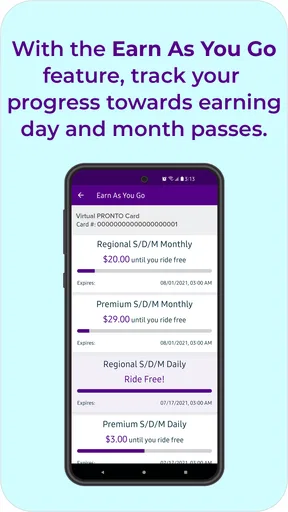
Yes, the app is designed to let riders purchase, load, and manage eligible transit products directly from their phone. Depending on the current fare options and participating agencies, you may be able to add stored value, buy day or monthly passes, and use a mobile ticket or account-based payment method when boarding. Always review the fare details before purchasing.
Does Pronto - San Diego provide real-time arrival information and trip planning?
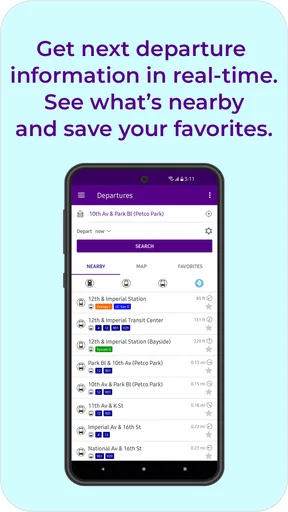
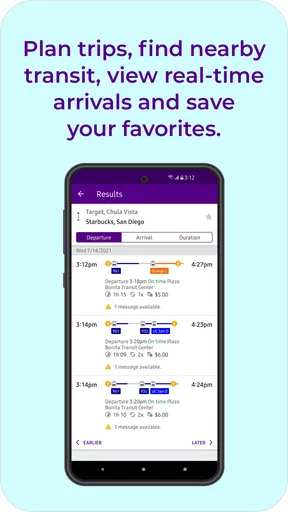
Pronto - San Diego includes tools for planning journeys and checking public transportation information across the San Diego area. You can search for routes, stops, departure times, and possible connections. Real-time vehicle information may be available for supported services, but accuracy can vary because traffic, service disruptions, maintenance, and network delays may affect arrival predictions.
Do I need an account, internet connection, or location access to use the app?
Some features may work without creating an account, but an account is generally helpful for managing payment methods, passes, balances, and travel history across devices. An internet or mobile data connection is normally required for current schedules, ticket purchases, and live updates. Location permission is optional in many cases, but enabling it can make finding nearby stops and stations faster.
Is Pronto - San Diego free, and what should I know before downloading it?
The Pronto - San Diego app is generally free to download, although using public transportation still requires paying the applicable fares. Additional mobile data charges may apply depending on your carrier. Before downloading, check that your device meets the app’s operating-system requirements and that you have a supported payment method if you plan to purchase fares. Keep the app updated for improved compatibility and service information.


